
Online menu ordering is no longer a side channel for restaurants. In the U.S., 47% of adults say they pick up takeout at least once a week, and 37% order delivery weekly, according to the National Restaurant Association.
TL;DR: Summary
- The best online menu ordering setup for most independent restaurants is a direct ordering system on a branded website that supports mobile checkout, modifiers, pickup and delivery rules, and low or zero per-order commissions.
- Demand is already there: the National Restaurant Association reports 47% of adults get takeout weekly and 37% order delivery weekly, so online ordering matches normal guest behavior.
- A PDF menu is not the same as online ordering. Restaurants usually need a searchable web menu, item modifiers, payment, order alerts, and fulfillment settings to reduce staff friction.
- Fit matters more than hype. Tools like Ordering Website, Toast, Square, ChowNow, Popmenu, BentoBox, SpotOn, and GloriaFood serve different needs around POS depth, marketing, direct orders, and migration.
- The highest-impact features are mobile-first menu design, direct website ordering, instant staff alerts, delivery zone controls, out-of-stock management, and clear reporting on conversion, order mix, and repeat orders.
That shift changes what a menu needs to do. A restaurant menu online should be searchable, mobile-first, operationally accurate, and easy to connect to pickup, delivery, and dine-in workflows.
Why does online menu ordering matter for restaurants now?
Yes, online menu ordering is now standard guest behavior. The National Restaurant Association and Toast both point to a market where off-premises dining and digital restaurant discovery happen often, not occasionally.
The behavior shift is clear. The National Restaurant Association says 47% of adults pick up takeout at least once a week, 42% use the drive-thru weekly, and 37% order delivery weekly. Toast, in a survey of 1,466 U.S. adults, found that 64% tried a new restaurant in the past month in 2025, up from 39% in 2024. If guests are routinely switching between discovery and ordering, the menu has to support both.
A common mistake is treating the online menu as a static brochure. A modern menu needs to help guests choose, customize, pay, and select fulfillment without calling the store. That is where tech-enabled ordering and payments stop being a nice extra and start becoming operating infrastructure.
“Ordering Website supports ordering from a restaurant website, Facebook page, and mobile app, a practical match for how guests move across channels.”
Should you use a PDF menu, a web menu, or a full online ordering system?
A full online ordering system is usually the right choice. PDF menus and simple web menus help with visibility, but Ordering Website and Toast-style checkout flows solve the real transaction problem.
The key difference is action. A guest can read a PDF, but cannot easily customize a burger, choose a pickup time, or pay in a few taps. A searchable web menu is much better than a PDF for mobile use and indexing, but it still falls short if checkout lives on the phone line.
After that, the choice becomes straightforward:
- PDF menu: Fast to publish, weak on mobile, poor for search, no live ordering logic.
- Web menu: Better readability and visibility, but may still push orders into calls or third-party apps.
- Online ordering system: Menu, modifiers, payment, instant alerts, pickup windows, and delivery fees in one flow.
If your staff still answers repeated questions about add-ons, allergen options, or whether an item is sold out, the menu format is likely the problem, not the guest.
What are the top online menu ordering tools for restaurants today?
These eight tools are strong options, but the best fit depends on your POS stack, commission tolerance, branding goals, and how much control you want over pickup, delivery, and direct guest relationships.
These are fit-based picks, not permanent rankings. Pricing, contracts, and integrations change often, so restaurants should verify current terms before choosing.
- Ordering Website: Strong for independent restaurants and takeaways that want branded website ordering, Facebook ordering, delivery zone controls, unlimited orders, and zero fees or commissions.
- Toast: Often a good fit for restaurants that want online ordering tied closely to a larger restaurant POS ecosystem.
- Square: Common among smaller operators already using Square payments or counter-service tools.
- ChowNow: Frequently compared by restaurants that want more direct ordering while still weighing convenience and channel reach.
- Popmenu: Relevant when menu presentation, guest messaging, and ordering sit in the same buying decision.
- BentoBox: A common benchmark for restaurants that want website design and online ordering under one hospitality-focused brand.
- SpotOn: Worth a look when the restaurant is comparing bundled POS, payments, and ordering software.
- GloriaFood: Still familiar to many independents, especially those evaluating migration options with minimal disruption.
A simple way to shortlist is this: if you care most about owning repeat orders and avoiding commissions, focus on direct ordering platforms first. If you are already deep in a POS ecosystem, prioritize integration quality and support response times.
How do you set up online menu ordering on your restaurant website?
The fastest path is direct website integration. Ordering Website uses a “See MENU & Order” button model, and that reflects a sound setup pattern for most restaurant sites.
Step 1 is to publish a structured menu with categories, items, modifiers, photos, and service types. Step 2 is to place the ordering entry point where guests actually look: header, hero area, menu page, and sticky mobile navigation. If the order button is hidden in the footer, conversion usually suffers.
“Ordering Website says setup starts by adding a ‘See MENU & Order’ button to the restaurant website, which keeps the path to checkout visible.”
Step 3 is operational testing. Place test orders for pickup and delivery, confirm alert routing, check printer output if used, and verify taxes, fees, and opening hours. Pro tip: test on an older iPhone and a mid-range Android device, not just a desktop browser. Most friction shows up on smaller screens.
How do you build an online menu that actually converts orders?
High-converting menus are clear, short, and operationally precise. Ordering Website highlights categories, modifiers, allergen-free icons, and food photos because those details reduce hesitation at checkout.
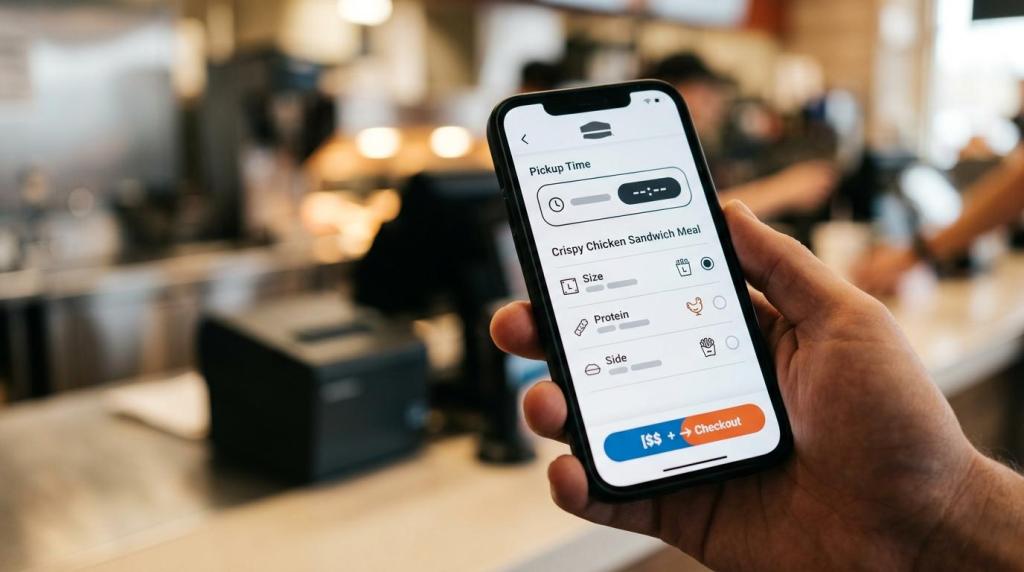
Start with category logic that matches how guests buy, not how the kitchen stocks ingredients. “Starters,” “Burgers,” and “Family Meals” work better than internal labels. Then add sensible modifier trees. If guests can pick size, protein, and side, keep that flow linear. A common mistake is building too many branching choices, which slows mobile checkout.
Next, tighten each item record. Use plain item names, a one-sentence description, price clarity, allergen cues when relevant, and one strong photo for high-volume items. Mark sold-out items quickly. If an operator waits until the next morning to update the menu, the digital menu becomes less trustworthy than the phone line.
Last, test for average order value without hurting speed. Add-ons, combo logic, and suggested extras work best when they feel natural. If the upsell interrupts every item, guests abandon carts.
What is the difference between direct ordering and marketplace apps?
Direct ordering gives restaurants more control, while marketplace apps often give broader discovery. Ordering Website and ChowNow-style direct channels usually win on margin control; large marketplaces often win on reach.
The trade-off is simple. Marketplaces can introduce first-time guests, especially in dense urban areas where Toast reports guests order from an average of 3.5 restaurants per month. Direct ordering helps restaurants keep repeat behavior on owned channels, where branding, data capture, and fee structure are easier to manage.
A common misconception is that restaurants must choose one or the other. Many do better with both. If a marketplace is producing new-customer demand, keep it as a top-of-funnel channel. If repeat customers already know your brand, move them toward your site, Facebook page, or branded app where reordering is easier and economics are cleaner.
The strongest rule is if-then logic. If a channel brings discovery, measure customer acquisition. If a channel brings repeat orders, measure retention and margin. The same menu does not need the same job everywhere.
How should restaurants handle delivery zones, pickup, and dine-in in one workflow?
One workflow is better than three disconnected ones. Ordering Website says it centralizes pickup, delivery, and dine-in orders, and that is the model most operators should aim for.
Step 1 is to define fulfillment rules by service type. Pickup needs prep-time accuracy and pickup windows. Delivery needs zones, fees, minimums, and driver logic. Dine-in ordering may need table context or reservation handoff. Keeping these rules in one system reduces missed tickets and conflicting availability.
“Ordering Website presents one system for pickup, delivery, and dine-in orders, plus an iOS and Android order-taking app for staff alerts.”
Step 2 is to map delivery zones carefully. Wider zones can increase volume, but they also stretch driver time, degrade food quality, and raise refund risk. If average delivery times start creeping up, tighten the radius or use distance-based pricing. That trade-off is operational, not just marketing.
Step 3 is live control. Staff should be able to mark items or add-ons out of stock immediately, pause a service type when the kitchen backs up, and adjust promised times during rush periods. Pro tip: the best delivery settings are the ones your shift lead can change in under a minute.
Which features matter most in an online menu ordering platform?
The highest-value features are operational, not decorative. Ordering Website, GloriaFood, and Toast-style systems vary in packaging, but the features that matter most tend to be the same.
A sleek interface helps, but restaurants usually feel the real impact in fewer phone calls, better item accuracy, and faster order intake. That is why feature evaluation should start with workflows, not homepage aesthetics.
- Menu logic: Categories, modifiers, allergen labels, item photos, and sold-out controls.
- Channel coverage: Website ordering, Facebook ordering, and mobile app support where relevant.
- Order handling: Instant alerts, receipt printing options, and an order-taking app for staff.
- Fulfillment controls: Pickup scheduling, delivery zones, distance-based pricing, and service-hour rules.
- Migration safety: Low-friction setup, no-code editing, and zero-downtime migration if moving from GloriaFood or another provider.
A useful misconception to drop is that more features automatically means better fit. A single-location takeaway may value fast setup and no commissions more than deep enterprise reporting. A multi-unit group may make the opposite choice.
How do you measure whether online menu ordering is working?
Success is measurable within weeks. National Restaurant Association demand data shows the market exists; your job is to track whether your system captures it efficiently and profitably.
Start with a baseline before launch or before switching platforms. Measure calls that become orders, average order value, order errors, and pickup versus delivery mix. Then compare that baseline to direct digital ordering after 30 days, broken out by lunch, dinner, and weekend demand.
Focus on these metrics first:
- Conversion rate: Menu visits compared with completed orders.
- Average order value: Whether modifiers, bundles, and add-ons raise ticket size.
- Order mix: Pickup, delivery, and dine-in shares by daypart.
- Error rate: Missed tickets, refunds, substitutions, and customer support contacts.
- Repeat behavior: How often guests come back through direct channels.
If conversion is low, the ordering path may be too long or the button too hard to find. If average order value rises but refunds rise too, modifier design may be too complicated. If pickup demand is strong and delivery lags, your delivery zones or fees may be the issue, not your menu.
A strong online menu ordering setup should make the guest path shorter and the staff path cleaner at the same time. That is the benchmark worth using when comparing any tool.